Built for your whole team
The AAC system where a student's own communication does the documentation, licensed per clinician, never per student.
Which of these is you?
Spin the wheel or tap your role, and we will take you to a page written for your job: your week, what answers it, and what it does not do yet.
- Superintendent or district leader: Risk found while it is cheap to fix.
- Director of special education: Every caseload, without chasing anyone.
- Principal or head of school: Families who already know.
- Special education teacher: This week’s words on every device.
- Speech-language pathologist: Your Sunday night, back.
- BCBA or behavior analyst: What happens between sessions.
- Clinic owner or clinical director: Evenings back, and families who stay.
- Lead SLP, AAC or AT specialist: Where every number comes from.
- IT, privacy or procurement: What you need to say yes.
Use the left and right arrow keys to turn the wheel. Every role is also listed as a link just above.
Drag to spin
What you actually get to see
These are the real screens, from a district with a full caseload loaded. The students are invented; nothing else is.
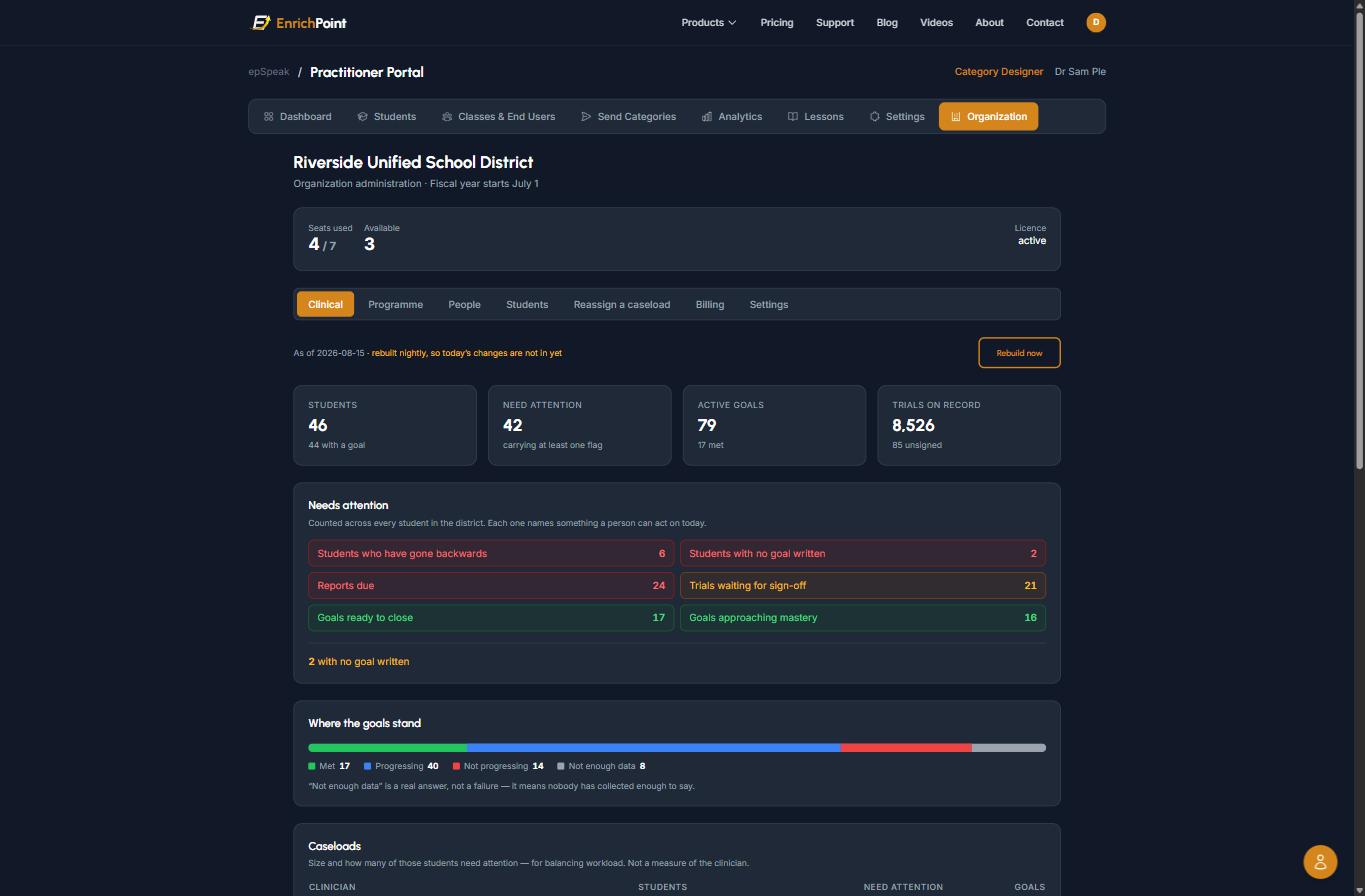
One screen for the whole district
What a special-education director opens on a Monday. Every caseload, rolled up, with the things that need a person listed as counts they can act on.
- Students, goals and recorded trials across every clinician, no chasing individual logins
- Needs attention breaks into real actions: students who have gone backwards, reports due, trials waiting for sign-off
- Goal status splits four ways, and "not enough data" is its own answer rather than being hidden inside a failure
- Seats used and available, so you know before renewal whether you are buying more
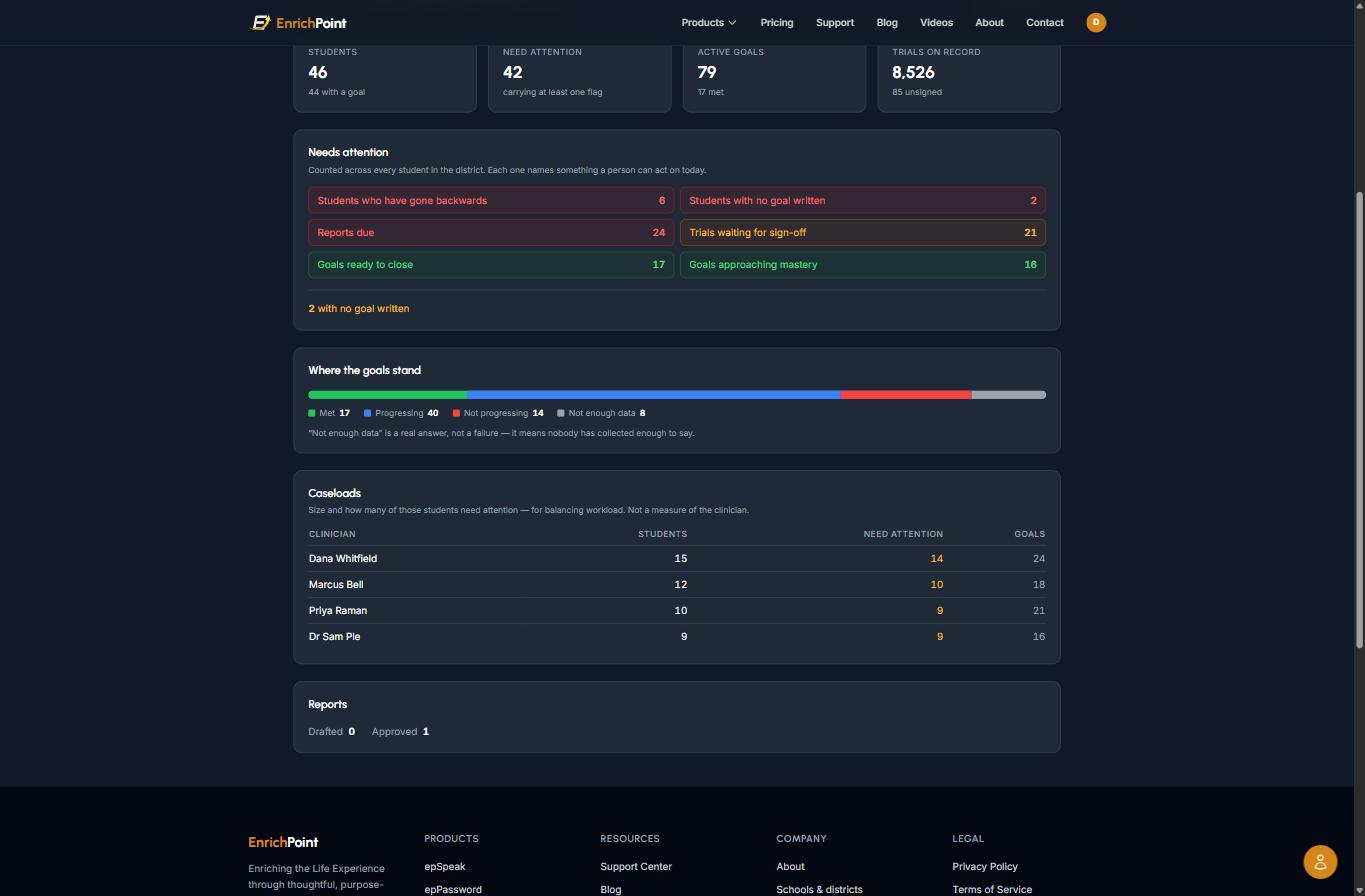
Workload, not performance
Who is carrying how much, and how much of it needs attention. Written to help balance a caseload, and deliberately not to rank clinicians.
- Students, flagged students and goals per clinician, side by side
- Makes an uneven caseload visible before it becomes a resignation
- The page says outright that this is not a measure of the clinician, because a table like this gets misread otherwise
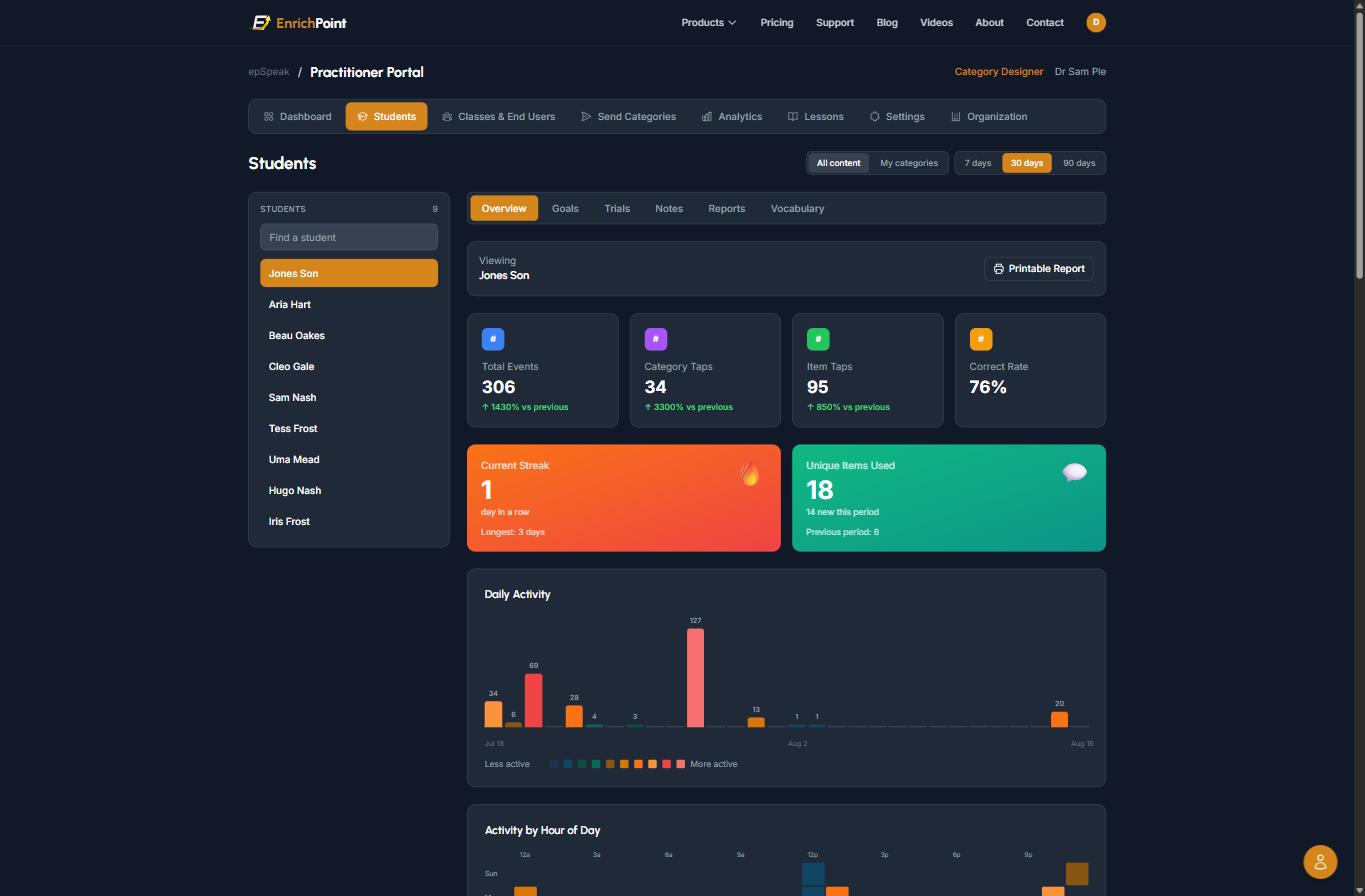
One student, and what the device already recorded
What a clinician opens before a session. None of this was typed up afterwards. It is what the child did on their own device, counted.
- Taps, correct rate and unique vocabulary, with the change against the previous period
- Daily activity and time-of-day patterns, the evidence behind "Tuesdays after lunch are hard"
- Goals, trials, notes, reports and vocabulary each have their own tab for this student
- A printable report for the IEP meeting, built from the same data rather than retyped
There is a billing view too. Your business office signs in and sees every quote and invoice with its purchase order number, each payment with your cheque or ACH reference so it reconciles against your ledger, what is outstanding, and when the term ends, without emailing us to ask.
Want to click around it rather than look at pictures? Ask us for a walkthrough. We would rather spend half an hour showing you than have you commit a term to finding out.
Licensed per clinician, never per student
An SLP with sixty students pays the same as one with twenty. Nothing in EnrichPoint counts children before giving them a voice, and the caseloads that need the most help cost the least per child.
The district owns the data
Goals, baselines and trial history belong to the organization, not to whoever recorded them. When a clinician leaves, their caseload transfers with everything intact.
Reports are drafted, never filed
Progress reports are assembled from confirmed session data. The clinician edits and signs. Nothing is shared with a family until they approve it.
Your data stays readable
If a subscription ends, existing records stay readable and exportable, and devices keep speaking. A lapsed contract never costs a child a word.
How it is priced
Per clinician seat, per year, by quote. A seat covers one SLP, OT or teacher, and there is no limit on how many students they support. You are buying for the adults, not per child. Terms run to your fiscal year end rather than a year from signing, so a first term starting part-way through is prorated and every renewal after it falls in one budget cycle.
If you are a single clinician buying for yourself rather than for a district, the Practitioner plan is the simpler route. A district seat carries the procurement, reporting and agreements you would not need.
How buying works
- Tell us your district and roughly how many SLPs you have.
- We send a written quote you can attach to a requisition.
- You issue a purchase order. We invoice against it on net-30 terms, payable by check or ACH.
- Seats activate on the purchase order, not on payment, so a district that buys in June can start in September.
We provide a W-9, can complete vendor registration, and will sign a data sharing and privacy agreement naming the district as data controller.
Talk to us
No account needed, and nothing is created until you say so.
Already part of a district using EnrichPoint? Go to your organization, or ask an administrator there to invite you.